Customers with hosting accounts on either yali or onza can now get free SSL certificates for websites, allowing you to have an https version of your website. We’re using the Let’s Encrypt certificate authority to provide the certificates.
To get a certificate and enable https hosting for your site, simply press the button in the control panel, and within 5 minutes you should have a working https site. You can find the option under “Web and Email Hosting“.
Free SSL at the press of a button
Let’s Encrypt certificates have a short expiry period, but we will take care of automatically renewing them for you.
Why use HTTPS/SSL?
Using SSL on your website means that traffic between our server and your user’s computers is encrypted and can’t be intercepted (despite David Cameron’s desires). It allows browsers to guarantee that they are indeed talking to the website shown in the address bar, even if they are using an untrusted network connection. Even if you don’t view the security aspects as a benefit, Google have previously announced that they will boost the page ranking of SSL-enabled sites.
Sphinx accounts
Unfortunately, this service is not yet available to customers on our sphinx server. We are working on that, and will have it enabled in the near future.
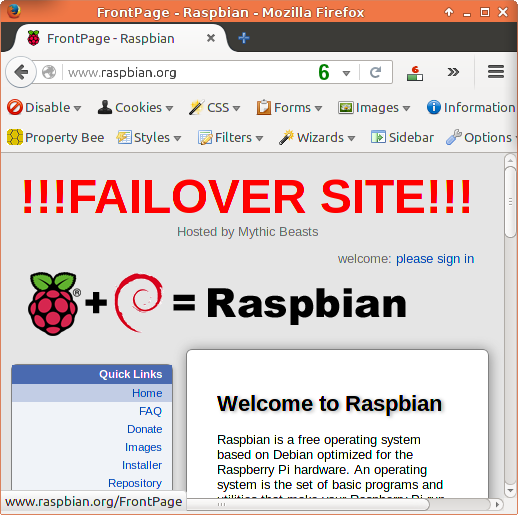
If you’ve had a look at the Raspbian website today you’ll have noticed the big red !!!FAILOVER TEST!!! logo at the top right corner. That’s because today is officially unimportant for Raspberry Pi, whereas in three weeks time it will be officially very important. Historically Christmas day sees our highest traffic loads as people unwrap their new Raspberry Pis and try them out. The most critical things for us to worry about are some of the educational and getting started resources on the website, and Raspbian and the mirror director so people can download new packages for their existing Raspberry Pis.
The majority of the website has a relatively small amount of data, so pulling an image from backup and redeploying is a relatively quick operation. Raspbian however is a bit harder – it’s a big image with around 4TB of data.
So we picked today to schedule a failover of Raspbian from it’s normal dedicated server to a VM hosted in the Raspberry Pi cloud. This is aiming to check
Is the failover server up to date and does it work?
Is the failover setup fast enough to keep up with the traffic load?
Does every service successfully fail over?
So far we’ve had a very smooth operation, we’ve had to add a couple of missing packages that had been overlooked during setup and testing, but basically we did a DNS flip and the whole site moved over.
If you like to discover that your disaster recovery system works before you have a disaster, have a look at our Managed Services or get in touch – sales@mythic-beasts.com.
A number of people noticed that Raspberry Pi had launched their $5 Pi Zero yesterday. We had advance warning that something was going to happen, even if we didn’t know exactly what. When the Pi2 launched we had some difficulties keeping up with comment posting and cache invalidation. We gave a very well received talk on the history and launch at the UK Network Operators Forum which you can see below.
Since then we’ve worked with Ben Nuttall to rebuild the entire hosting setup into an IPv6-only private cloud, hosted on one of our very large servers. This gives us :
Containment: One part of the site can’t significantly impact the performance of another.
Scalability: We can pull VMs into our public cloud and duplicate them if required.
Flexibility: We no longer have to have a single software stack that supports everything.
For the Pi 2 launch we sustained around 4500 simultaneous users before we really started struggling with comment posting and cache invalidation. So our new plan was to be able to manage over 5,000 simultaneous site users before we needed to start adding more VMs. This equates to around 1000 hits per second.
In order to do this, we need to make sure we can serve any of the 90% of the most common requests without touching the disks or the database; and without using more than 10ms of CPU time. We want to reserve all our capacity for pages that have to be dynamic – comment-posting and forums, for example – and make all the common content as cheap as possible.
So we deployed a custom script staticify. This automatically takes the most popular and important pages, renders them to static HTML and rewrites the webserver configuration to serve the static pages instead. It runs frequently so the cache is never more than 60 seconds old, making it appear dynamic. It also means that we serve a file from filesystem cache (RAM) instead of executing WordPress. During the day we improved and deployed this same code to the MagPi site including some horrid hackery to cache popular GET request combinations.
Found and hacked around the last non-cacheable item on the Magpi homepage, load now 6, was 130.
If you deployed the blog unoptimised to AWS and just had auto-magic scaling, we’d estimate the monthly bills to be many tens of thousands of dollars per month, money that instead can be spent on education. In addition you’d still need to make sure you can effortlessly scale to thousands of cores without a single bottleneck somewhere in the stack causing them all to lie idle. The original version of the site (with hopeless analytics plugin that processed the complete site logs on every request) would consume more computer power than has ever existed under the traffic mentioned above. At this scale optimisation is a necessity, and if you’re going to optimise, you might as well optimise well.
That said, we think some of our peers possibly overstated our importance in the big scheme of things,
Fenrir is the latest addition to the Mythic Beasts family. It’s a virtual machine in our Cambridge data centre which is running our blog. What’s interesting about it, is that it has no IPv4 connectivity.
eth0 Link encap:Ethernet HWaddr 52:54:00:39:67:12
     inet6 addr: 2a00:1098:0:82:1000:0:39:6712/64 Scope:Global
     inet6 addr: fe80::5054:ff:fe39:6712/64 Scope:Link
     UP BROADCAST RUNNING MULTICAST MTU:1500 Metric:1
It is fronted by our Reverse Proxy service – any connection over IPv4 or IPv6 arrives at one of our proxy servers and is forwarded on over IPv6 to fenrir which generates and serves the page. If it needs to make an outbound connection to another server (e.g. to embed our Tweets) it uses our NAT64 service which proxies the traffic for it.
All of our standard management services are running: graphing, SMS monitoring, nightly backups, security patches, and the firewall configuration is simpler because we only need to write a v6 configuration. In addition, we don’t have to devote an expensive IPv4 address to the VM, slightly reducing our marketing budget.
For any of our own services, IPv6 only is the new default. Our staff members have to make a justification if they want to use one of our IPv4 addresses for a service we’re building. We now also need to see how many addresses we can reclaim from existing servers by moving to IPv6 + Proxy.
Yesterday we did a routine disk replacement on a machine with software RAID. It has two mirrored disks, sda and sdb with a RAID 1 partition with software RAID, /dev/md1 mirrored across /dev/sda3 and /dev/sdb3. We took the machine offline and replaced /dev/sda. In netboot recovery mode we set up the partition table on /dev/sda, then set the array off rebuilding as normal:
mdadm --manage /dev/md1 --add /dev/sda3
This expects to take around three hours to complete, so we told the machine too boot up normally and rebuild in the background while being operational. This failed – during bootup in the initrd, the kernel (Debian 3.16) was bringing up the array with /dev/sda3, but not /dev/sdb3, claiming it didn’t have enough disks to start the array and refusing to boot.
Within the initrd if I did:
mdadm --assemble /dev/md1 /dev/sda3 /dev/sdb3
the array refused to start claiming that it didn’t have sufficient disks to bring itself online, but if I did:
within the initrd it would bring up the array and start it rebuilding.
Our netboot recovery environment (same kernel) meanwhile correctly identifies both disks, and leaves the array rebuilding happily.
To solve it we ended up leaving the machine to rebuild in the network recovery mode until the array was fully redundant at which point the machine booted without issue. This wasn’t an issue – it’s a member of a cluster so downtime wasn’t a problem – but in general it’s supposed to work better than that.
It’s the first time we’ve ever seen this happen and we’re short on suggestions as to why – we’ve done hundreds of software RAID1 disk swaps before and never seen this issue.
One of the outstanding tasks for full IPv6 support within Mythic Beasts was to make our graphing server support IPv6 only hosts. In theory this is trivial, in practice it required a bit more work.
Our graphing service uses munin, and we built it on munin 1.4 nearly five years ago; we scripted all the configuration and it has basically run itself ever since. When we added our first IPv6 only server it didn’t automatically get configured with graphs. On investigation we discovered that munin 1.4 just didn’t support IPv6 at all, so the first step was to build a new munin server based on Debian Jessie with munin 2.0.
Our code generates the configuration file by printing a line for each server to monitor which includes the IP address. For IPv4 you print the address as normal, 127.0.0.1, for IPv6 you have to encase the address in square brackets [2a00:1098:0:82:1000:0:1:1]. So a small patch later to spot which type of address is which and we have a valid configuration file.
Lastly we needed to add the IPv6 address of our munin server into the configuration file of all the servers that might be talked to over IPv6. Once this was done, as if by magic, thousands of graphs appeared.
We have been offering IPv6-only Virtual Servers for some time, but until now they’ve been of limited use for public-facing services as most users don’t yet have a working IPv6 connection.
Our new, free IPv4 to IPv6 Reverse Proxy service provides a shared front-end server with an IPv4 address that will proxy requests through to your IPv6-only server. The service will proxy both HTTP and HTTPS requests. For HTTPS, we use the SNI extension so the proxy can direct the traffic without needing to decrypt it. This means that the proxy does not need access to your SSL keys, and the connection remains end-to-end encrypted between the user’s browser and your server.
The service allows you to specify multiple backend servers, so if you have more than one server with us, it will load balance across them.
The IPv4 to IPv6 Reverse Proxy can be configured through our customer control panel. Front ends can be configured for hostnames within domains that are registered with us, or for which we provide DNS.
Yesterday was the second meeting of the UK IPv6 Council. Eleven months ago Mythic Beasts went along to hear what the leading UK networks were doing about IPv6 migration. Mostly they had plans, and trials. However, the council is clearly useful: Last year, Nick Chettle from Sky promised that Sky would be enabling IPv6 in 2015. His colleague, Ian Dickinson gave a follow-up talk yesterday and in the past two months UK IPv6 usage has grown from 0.2% to 2.6%. We think somebody had to enable IPv6 to make his graph look good for today’s presentation…
In the meantime, Mythic Beasts has made some progress beyond having an IPv6 website, email and our popular IPv6 Health Check. Here’s what we’ve achieved, and not achieved in the last twelve months.
Added NAT64 for hosted customers to access other IPv4 only services.
Added multiple downstream networks, some of which are IPv6 only.
Raspberry Pi has a large IPv6 only internal network – 34 real and virtual servers but only 15 IPv4 addresses, and integrations with other parts of their ecosystem (e.g. Raspbian) are also IPv6.
IPv6 for all DNS servers, authoritative and resolvers
IPv6 for our single sign on authentication service (this was one of the hardest bits).
Our SMS monitoring fully supports IPv6 only servers (this was quite important).
Our backup service fully supports IPv6 only servers (this was very important).
Direct Debits work over IPv6, thanks to GoCardless
Internal Successes
IPv6 on our own internal wiki, MRTG, IRC channels
Full Ipv6 support for connectivity to and out of our gateway server.
IPv6 rate limiting to prevent outbound spam being relayed.
Everything works from IPv6 with NAT64.
Prototypes
Shared IPv4/IPv6 load balancer for providing v4 connectivity to v6 only hosted services.
Still to do
Our card payment gateway doesn’t support IPv6.
Our graphing service doesn’t yet support IPv6-only servers (edit – implemented 15th October 2015).
Automatic configuration for an IPv6-only primary DNS server which slaves to our secondary DNS service.
Billing for IPv6 traffic.
One shared hosting service still has incomplete IPv6 support. One shared hosting service has optional instead of mandatory IPv6 support.
Automatic IPv6 provisioning for existing server customers.
Make sure everything works from IPv6 with no NAT64.
Waiting on others
The management interfaces for our DNS wholesalers don’t support IPv6.
A Cambridge start-up approached us with an interesting problem. In this age of virtualisation, they have a new and important service, but one which can’t be virtualised as it relies on trusted hardware. They know other companies will want to use their service from within their private networks within the big cloud providers, but they can’t co-locate their hardware within Amazon or Azure.
This picture is a slight over simplification of the process
The interesting thing here is that the solution is simple. It is possible to link directly into Amazon via Direct Connect and to Azure via Express Route. To use Direct Connect or Express Route within the UK you need to have a telco circuit terminating in a Telecity data centre, or to physically colocate your servers. As many of you will know, Mythic Beasts are physically present in three such data centres, the most important of which is Telecity Sovereign House, the main UK point of presence for both Amazon and Microsoft.
So our discussion here is nice and straightforward. Our future customer can co-locate their prototype service with Mythic Beasts in our Telecity site in Docklands. They can then connect to Express Route and Direct Connect over dedicated fibre within the datacentre when they’re ready to take on customers. Their customers then have to set up a VPC Peering connection and the service is ready to use. This is dedicated specialised hardware from the inside of ‘the cloud’, and it’s something we can offer to all manner of companies, start-up or not, from any dedicated or colocated service. You only need ask.
A customer of ours has been extending their private cloud. This adds another 160 cores, 160Gbps, 2TB of RAM and over half a petabyte of storage. On the left you can see the black mains cable, then the serial for out of bound configuration, then red cabling for 1Gbps each to our main network, then 20Gbps per server to the very secure private LAN on SFP+ direct attach.
The out of place yellow cable is network for the serial server above, and the out of place black one is serial to the 720Gbps switch which isn’t quite long enough to route neatly.
There’s a few more bits and pieces to add, but soon it will join their OpenStack cloud and substantially increase the rate at which their data gets crunched.