Log4J security issues

December 13th, 2021 by

A log cut into snail shells (public domain image from Simpon Speed)

On Friday 10th December we became aware of an extremely serious security issues in Log4J, a logging component in widespread use by applications written in the Java programming language.  The vulnerability has been nicknamed Log4Shell.

What is Log4Shell and Log4J

Log4J is a library to make writing data to a log file easier. It’s highly configurable to make it easy to send the right level of logging data to the right place and it includes bits of intelligence so you can log placeholders and have Log4J fill in the correct value for the environment. So if you’re logging an error in your application and you want to know what version of java is currently running your application you can log:

${java:version}

which will be replaced with the currently running version number of Java.

However, it is very common for log messages to contain user-supplied data.  For example, a login form might log the username from a failed login attempt, and many applications don’t check the data the user supplied for magic values like this.  So, if I were to attempt to log in with a username of ${java:version} instead of Pete, the logfiles will say:

Failed login attempt for user: "OpenJDK Runtime Environment (build 11.0.11+9-Ubuntu-0ubuntu2.20.04)"

rather than what the application developer expected which would be:

Failed login attempt for user: "${java:version}"

One of the other magic strings uses LightWeight Directory Access Protocol (LDAP) to look up data from a remote server and the remote server can specify additional software to install and run in order to process the answer from the LDAP server.

If an end user can set something that will go to a log file to a magic LDAP string pointing at a server they control they can make the java application request code from that server and make the target system execute code they just supplied. This effectively hands full control over the java application to the person that logged the magic LDAP string. Effectively you can turn a piece of data that is logged into an administrative shell on the target server, hence the name Log4Shell.

The vulnerability is very nasty for a number of reasons. Firstly, it’s a trivial-to-exploit remote code execution vulnerability. You literally send the application a URL to the code you want run and it runs it. Secondly, Log4J is very widely used, including in custom software, and many applications are likely to be vulnerable.

Managed customers

As part of our server management service, we monitor and assess all security advisories for operating system packages, applying serious 0-day vulnerabilities immediately to customer servers.

Unfortunately, Java applications almost never use system-provided libraries, and will instead bundle their dependencies as part of the application. From the point of view of our managed service, updating Java applications with an embedded Log4J is the technically the responsibility of the customer.

However, given the severity and ease of exploit of this vulnerability, we’ve been doing everything we can to help customers who may not even know that they’re reliant on Log4J, let alone where their application is vulnerable.

Going above and beyond

As part of our managed service we install an internally written package called Mythic Reporter. This logs a lot of data from servers every day about what the servers are doing. We then have a centralised process that reads the reports and automates auditing for common issues. With this we can spot things like:

  • One of the hardware devices in your storage array is broken or is in a pre-failure state.
  • Database replication appears not to be working.
  • A filesystems has gone read-only.
  • You have mirrored filesystems but not mirrored swap space.
  • The cryptographic keys used by ssh that are weak or are blacklisted.
  • You have a database running but no backups configured.
  • You’re using the stock i40 network module for Debian which is unstable.
  • Your server has thermally throttled.
  • … and many others.

We can also utilise this dataset for other things. We log the full process list and listening network sockets for every managed server every day. So it’s a small matter of scripting on our reporter server to find the full list of client servers that have a network listening application written in Java. One staff member set about writing a customer notification, one understanding how nasty the security issue was and one building the full list of likely affected customers.

To every managed server customer running a java server process, we sent this email:

We have become aware of a serious security vulnerability in the log4j
logging package for Java. You're receiving this email because our 
records show that your managed server is running Java.

At this point, a full list of applications that are affected by this
vulnerability is not available, but given the widespread use of log4j, 
the severity of the vulnerability (remote code execution) and the
typical ease of exploitation, we strongly recommend investigating
proactively whether any Java applications that you are using are
vulnerable.

Your Mythic Beasts managed service includes monitoring and upgrading of
operating system packages, but does not cover software installed by
other means.  Java applications typically rely on JAR files that are not
provided by system packages, and in this case we are not able to detect
or apply necessary upgrades.

You can find more information on the vulnerability, and the affected
versions of log4j, here:

  https://www.lunasec.io/docs/blog/log4j-zero-day/

Whilst we cannot assess whether your server is vulnerable to this
vulnerability, we are happy to provide advice based on the information
that we have.

We detected Java running on the following servers:

-- list of servers --

We then opened tickets in our ticket tracking system for all affected customers so we could close them off once we’re confirmed they were either not vulnerable, or had been patched.

Auditing

We then started auditing the identified customer servers, scanning for installations of the Log4J library and notifying customers as to whether the libraries they have installed are vulnerable or not. We utilised reports from software providers to prioritise fixes. For example Jenkins may be affected depending on the plugins used.

We have worked through the list contacting every customer to confirm if we or they could upgrade the affected component or if we could mitigate through configuration changes, and this afternoon we have been chasing likely affected customers who haven’t responded to encourage them strongly to work with us to fix this issue.

If you run Java-based services and you’re not already a customer of our managed hosting service, then you’ve probably been quite busy over the last few days. If you haven’t been, then you may want to consider signing up.

Dependency management

Log4Shell is a somewhat vicious lesson in dependency management. Every time you import third party code, you need a process for monitoring security advisories for it, and for updating it as required. This is why we have a strong preference for using operating system packages wherever practical, as this delegates the whole problem to the operating system maintainers and makes automatically finding and updating affected libraries trivial. Being able to automatically find vulnerable packages is critical, as you can be guaranteed that when a serious vulnerability is discovered, the bad guys will automate it.


8GB and overclocked Raspberry Pi servers

June 15th, 2021 by
Pi 4 with PoE HAT

Our Pi 4 servers all wear the Power over Ethernet HAT to provide power and cooling to the CPU.

Since the launch of the 8GB Raspberry Pi 4 we’ve had many requests to add these to our Raspberry Pi cloud. Meanwhile many Raspberry Pi users have read about overclocking the Raspberry Pi and running at a higher clock speed.

Overclocking further increases the computing power of the Pi, but brings significant operational issues for our Pi cloud. Not all Raspberry Pi hardware will run reliably at the higher clockspeed and the higher voltage required to support it. Increasing the clockspeed and voltage significantly increases the power consumption and thus the cooling requirements necessary to prevent overheating. We’ve spent a considerable amount of time testing and we’re now ready to launch our first 8GB Raspberry Pi 4 cluster. We’re offering them at two clock speeds: the stock 1.5GHz and overclocked to 2GHz.

The overclocked Raspberry Pis have all been run at a significant CPU load for several weeks to test their stability before release. Any that failed the stability test have been added to the cloud at the normal 1.5GHz clockspeed.

The 8GB Pi is available at 1.5GHz and 2GHz clock speeds. Supported operating systems are Raspberry Pi OS 64 and Ubuntu 64.

Larger fans provide more cooling to our 8GB Pi4 cloud so we can run at higher clockspeeds.

VPS API, on-demand billing and dormant VPSs

May 14th, 2021 by

Dormant mode means your VPS can have a nice snooze.

We’ve recently rolled out some new features that provide more flexibility to our VPS platform.

On-demand billing

Last year we added on-demand billing to our Raspberry Pi Cloud and we’ve now rolled this out to our VPS services, allowing you to add and remove VPSs at any time and pay by the second for the time that the server is provisioned. We continue to offer monthly, quarterly and annual billing options, with discounts for longer billing periods, allowing users to choose between the best pricing for long term usage and the convenience of on-demand, pay-as-you go pricing.

Dormant VPS mode

We’ve also added the ability to make an on-demand VPS dormant, so that you’re only charged for the server’s storage space (and any allocated IPv4 addresses) until you want to reactivate it. Dormant VPSs can be reactivated at any time, although it is not guaranteed that you will be able to re-provision to the same specification of server immediately. The RAM and CPU previously allocated to your server may have been reallocated, and a move to a different host server may be required.

VPS management API

We have also added an API for managing on-demand VPSs, allowing the creation and deletion of servers to be automated. The API is very similar to our API for managing Raspberry Pi Cloud servers. To get started, see our API docs.

Cloud-init user data

We use cloud-init to automate operating system installation when provisioning a new VPS. The installation can be customised using cloud-init user data, which can provide additional installation steps to be performed after the first boot. User data can be provided through both the control panel and the API. It also possible to store and re-use user data snippets in the control panel, making it easy to repeatably spin up new servers with your applications already installed and configured.

More capacity

We continue to add capacity to our cloud to keep up with customer demand with the most recent expansion being in our London Meridian Gate (MER) zone.

Private cloud improvements

Our Private Cloud service gets you the features and convenience of our public VPS platform, but provided on your own dedicated servers. We’ve recently rolled out improvements to our Private Cloud platform, allowing Private Cloud servers to be provisioned and managed via the API and control panel.

More DNS API fun: find an IP across all zones

September 21st, 2020 by

A customer was doing an IP address change on a server and wanted a quick way to find all references to the old IP address across all of their domains.

This seemed like a good job for our DNS API and a few UNIX utilities.

Finding matching records

Our DNS API makes it easy to find records with particular content:

curl -sn https://api.mythic-beasts.com/dns/v2/zones/example1.com/records?data=1.2.3.4

The -n assumes we’ve got a .netrc file with our API credentials. See our DNS API tutorial for more details.

This gives us a block of JSON with any matching records:

{
  "records": [
    {
      "data": "1.2.3.4",
      "host": "www",
      "ttl": 300,
      "type": "A"
    }
  ]
}

jq lets us turn the presence or absence of any matching records into an exit code that we can test with an if statement by piping into the following:

jq -e '.records | length > 0' 

This counts the number of members of the records array, and -e sets the exit code based on the output of the last expression.

Getting a list of zones

We want to check this across all zones, so let’s get a list of zones:

curl -sn https://api.mythic-beasts.com/dns/v2/zones

This gives us some JSON:

{
  "zones": [
    "example1.com",
    "example2.com"
  ]
}

What we really want is a flat list, so we can iterate over it in bash. jq to the rescue again. Simply pipe into:

jq -r '.zones[]'

and we get:

example1.com
example2.com

Putting it all together

Putting this all together with a for loop and an if:

IP=1.2.3.4
for zone in $(curl -sn https://api.mythic-beasts.com/dns/v2/zones | jq -r '.zones[]') ; do
  if curl -sn "https://api.mythic-beasts.com/dns/v2/zones/$zone/records?data=$IP" |\
      jq -e '.records | length > 0' >/dev/null ; then 
    echo "$IP found in $zone"
  fi
done

Gives:

1.2.3.4 found in example1.com

More than one way to do it

Another approach would be to use the zone file output format and check if the output is empty or not:

curl -sn -H 'Accept: text/dns' \
  "https://api.mythic-beasts.com/dns/v2/zones/$zone/records?data=$IP"

This give us matching records, one per line:

www         300 A 1.2.3.4

We can then test if we’ve got any matches using ifne (if-not-empty, part of the moreutils package in most distributions):

curl -sn -H 'Accept: text/dns' \
  "https://api.mythic-beasts.com/dns/v2/zones/$zone/records?data=$IP" \
  | ifne echo $IP found in $zone

Access to our DNS API is included with all domains registered with us. API credentials can be limited to individual zones or even records, can be either read/write or read-only.

ANAME records

Of course, it’s generally desirable to avoid including an IP address in lots of different DNS records in the first place. It’s preferable to assign the IP to a single hostname, and then point other records at that. Our DNS service supports ANAME records which allow the use of hostnames rather than IP addresses in places where CNAMEs cannot be used.

Save £700/month with a Mythic Beasts VPS and OpenStreetMap

June 30th, 2020 by

Cambridge Freegle pictured on a map backed by OpenStreetMap tiles from the Mythic Beasts hosted tile server.

We’re supporters of Freegle, a charity that recycles unwanted things by passing them on to new owners. As the COVID-19 lockdown is eased, many people have de-cluttered and have things available to be passed on to new owners. Similarly, a number of people have been struggling financially and will benefit from donations. Traffic on Freegle has rocketed.

Freegle used to use Google Maps for displaying items. In 2018, Google changes the terms for their maps service moving to pay-as-you-go, per-tile-served pricing model. Many sites are able to operate within the a $200/month fee credit, which buys 200,000 monthly tile requests. Freegle is now seeing enough usage to incur bills of over £750/month for map tiles — a significant expense for a small charity.

As is often the case with usage-based cloud services, a free, or very low, initial price can quickly escalate into a large and uncontrollable cost.

Fortunately, as is often the case, a comparable alternative based on open source software exists and can provide a much lower total overall cost.

Freegle contacted us looking for help in moving to their own tile server based on OpenStreetMap, providing lower – and just as importantly – fixed monthly costs.

Running an OpenStreetMap tile server

Freegle are using a Mythic Beasts virtual server to host OpenStreetMap docker image, fronted by NGINX to provide HTTPS and HTTP/2 support. The initial approach of rendering tiles on demand proved to be far too slow, so tiles are now pre-rendered and cached on SSD. Full details can be found in their article, Junking Google Maps for OpenStreetMap.

The initial pre-rendering is being done with a 256GB/16 core server. This is expected to complete within a few days, and once done, the server will be scaled down to 16GB/4 cores for normal production usage.

Costs for this custom solution? One working day of staff time, a few days of a fast virtual server (~£60), and the monthly cost of the product virtual server (~£50) which nets current monthly savings of £700 and gives long term guaranteed price stability.

The convenience of cloud without the price tag

Being based on open source software, there’s no risk of a future change in terms making the service unaffordable, and Freegle aren’t locked in to a single provider’s proprietary API. If we were to hike our prices, Freegle could easily move their service to another provider (although based on recent experience, we’re more likely to do the opposite).

Freegle implemented this service themselves on our VPS platform, but we can also offer this as a managed application, giving the convenience of a cloud-style service, but without the cloud-style lock-in and pricing.

New improved VPS pricing

June 25th, 2020 by

Time passed and everything grew.

We have just rolled out a substantial update to our price list for virtual private servers.

The new price list is significantly better value, and also introduces the ability to specify storage independently of RAM and CPU. Servers can be configured with either SSD or HDD-backed storage, with sizes ranging from 5GB to 4TB.

This is immediately available in all six VPS zones: London UK (HEX, MER and SOV), Cambridge (UK), Amsterdam (NL) and Fremont (US).

Better prices

Our base prices for virtual servers have decreased, making them even better value with prices now starting from £47/year. CPU, RAM and disk space have all fallen in price. The only price we haven’t reduced is our IPv4 address pricing, but we have held that constant, despite the continuing depletion of the world’s limited supply of these legacy addresses.

More options

We have expanded our range of products. To meet customer demand for larger servers, we’ve now added 192GB and 256GB options with up to 16 cores. We’ve also introduced additional intermediate products.

More capacity

In addition to adding our US zone recently, we have added more capacity in all four of our UK zones to support upgrades and additional customers.

New OS images

We have also improved our standard OS images to support our new enhanced DNS infrastructure. We’re now automatically recreating and retesting them, rather than security updating on first install. This reduces the amount of time taken for your VPS to be provisioned in all of our sites.

Existing customers

We have always avoided unsustainable introductory pricing, and “new customer only” offers. We prefer to reward loyalty, which is why existing customers have already received an email with details of a specification upgrade that puts them on an even better deal than our new list pricing.

Raspberry Pi 4 now available in our Pi Cloud

June 17th, 2020 by
PI 4 with PoE HAT

Our PI 4 servers all wear the Power over Ethernet HAT to provide power and cooling to the CPU.

We’re now offering these in our Raspberry Pi Cloud starting from £7.50/month or 1.2p/hour.

Since the release of the Raspberry Pi 4 last year, it’s been an obvious addition to our Raspberry Pi cloud, but it’s taken us a little while to make it happen. Our Raspberry Pi Cloud relies on network boot in order to ensure that customers can’t brick or compromise servers and, at launch, the Pi 4 wasn’t able to network boot. We now have a stable replacement firmware with full PXE boot support.

The Pi 4 represents a significant upgrade over the Pi 3; it is over twice as fast, has four times the RAM and the network card runs at full gigabit speed. On a network-booted server this gives you much faster file access in addition to more bandwidth out to the internet. We’ve done considerable back-end work to support the Pi 4. We’ve implemented:

  • New operating system images that work on the Pi 4 for 32 bit Raspberry Pi OS and Ubuntu.
  • A significant file server upgrade for faster IO performance.
  • Supporting the different PXE boot mode of the Pi 4 without impacting our Pi 3 support.

Ben Nuttall has been running some secret beta testing with his project Pi Wheels which builds Python packages for the Raspberry Pi. We’re grateful for his help.

Is it any good?

tl;dr – YES

We’ve historically used WordPress as a benchmarking tool, mostly because it’s representative of web applications in general and as a hosting company we manage a lot of those. So we put the Raspberry Pi 4 up against a Well Known Cloud Provider that offers ARM instances. We benchmarked against both first generation (a1) and second generation (m6g) instances.

Our test was rendering 10,000 pages from a default WordPress install at a concurrency level of 50.

Raspberry Pi 4 a1.large m6g.medium
Spec 4 cores @ 1.5Ghz
4GB RAM
2 cores
4GB RAM
1 core
4GB RAM
Monthly price £8.63 $45.35
(~ £36.09)
$34.69
(~ £27.61)
Requests per second 107 52 57
Mean request time 457ms 978ms 868ms
99th percentile request time 791ms 1247ms 1056ms

In both cases the Pi 4 is approximately twice as fast at a quarter of the price.

Notes:

  • Raspberry Pi 4 monthly price based on on-demand per-second pricing.
  • USD to GBP conversion from Google on 17th June 2020

Automating DNS challenges

May 5th, 2020 by

We recently announced our new DNS API which we’ve just moved out of beta and into production. 

One of the goals of the new API was better support for automating DNS-based challenges, such as those used by Let’s Encrypt to authenticate certificate requests. 

DNS-based challenges are needed to obtain wildcard certificates from Let’s Encrypt, and can be a convenient way to get certificates for hostnames that don’t a have publicly accessible web server, but can be tricky to implement due to delays in updating DNS records, and automatic requires having credentials capable of DNS records for your domain stored on your server.

The new API has a number of features to address these issues.

Restricted credentials

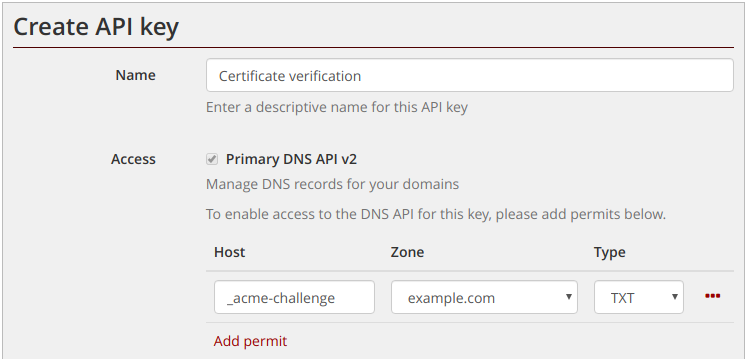
The DNS API allows you to create API credentials that are restricted to editing specific records within your domain.  Credentials can be restricted by hostname, record type, or both.

For example, you can create credentials that can only edit the _acme-challenge TXT record needed for Let’s Encrypt challenges. Access to the DNS API is potentially very sensitive, so it makes sense to limit access as much as possible.

Restricted API key

Record verification

Updates made via the API do not become live immediately. There is a delay of up to a minute before they hit our master nameserver, and a potential further delay of a few seconds before the record propagates to our authoritative nameservers. When responding to a DNS-based challenge, you will typically want to ensure that the record is actually live before proceeding with verification.

Our DNS API provides a “verify” feature, that checks that records are live on all authoritative nameservers. For example, a GET request to the following URL would check that the nameservers have the latest update to the record:

https://api.mythic-beasts.com/dns/v2/zones/example.com/records/_acme-challenge/TXT?verify

This will return a 200 response if the nameservers are up-to-date, and 409 if they are not. This can be used to script a check after updating a record:

#!/bin/sh

ZONE=example.com
RECORD=_acme-challenge
TYPE=TXT

for i in $(seq 1 12); do
    RES=$(curl -n https://api.mythic-beasts.com/dns/v2/zones/$ZONE/records/$RECORD/$TYPE?verify -qs -w '%{http_code}' -o /dev/null)
    case $RES in
        200)    echo Records updated
                exit 0
                ;;
        409)    echo "Not yet updated ($i/12)"
                ;;
        *)      echo "Unexpected error: $RES"
                exit 1
                ;;
    esac
    sleep 10
done
echo Timed out
exit 2

Obtaining certificates the easy way

Our preferred Let’s Encrypt client is the excellent dehydrated, and we maintain a hook script for supporting DNS-based challenges in dehydrated. We haven’t yet updated the hook script to support our new API, but will be doing so soon and will post details here when it’s ready.

US hosting launch

April 24th, 2020 by

Now offering servers at 122″ W

In 2018, we gained a small presence in the US thanks to our acquisition of BHost.  Establishing a US presence had been a long-standing company plan, and the acquisition gave us a very useful starting point.

Whilst we’ve been supporting and upgrading existing customers in the US, we wanted to implement some network and infrastructure changes before taking on any new customers.

In early February we combined a trip to the North American Network Operator Group in California with a substantial deployment of new equipment into the facility in Fremont, and we’re pleased to announce that our US site is now fully open for business.

New VPS cloud

We’ve deployed a cluster of brand new VPS host servers, and Fremont is now available as a zone when ordering a VPS. As we’ve done elsewhere, we’re also migrating all ex-BHost customers into our VPS cloud, upgrading everyone to KVM-based virtual machines with newer faster hardware. For ex-BHost users on the OpenVZ containerisation platform this is a significant upgrade to full virtualisation with no hardware contention and at no additional cost.

New DNS resolvers

Fremont to London latency is approximately 130ms.  To support US-based servers, we’ve deployed new resolvers in Fremont so that DNS resolution can be local and fast. This includes local DNS64/NAT64 servers for the benefit of IPv6-only hosting customers. We are also mirroring this improvement to our Cambridge and Amsterdam data centres for faster DNS resolution and local NAT64 in all our sites.

This is the Fremont Internet Exchange. We connect on the yellow fibre.

Network services

We’re now operating our own, fully routed network in the Fremont 2 data centre, and can offer network services to VPS and colocation customers in this facility. You can bring your own IP space to your virtual machine, and you can have BGP sessions to dynamically advertise your routes. Customers taking BGP will see a full routing table, combining transit routes from our upstreams with shorter, faster routes through the internet exchanges. We can also offer very low bandwidth connections (suitable for out-of-band connectivity), and transit connections with 95th percentile billing within the Fremont 2 data centre.

Network core

We’ve deployed a pair of routers to provide improved redundancy. These each have a full internet uplink and a link to a peering exchange. One connects at 10Gbps to the San Francisco Metropolitan Internet Exchange and the other at 10Gbps to the Fremont Cabal Internet Exchange. We’re peering as Autonomous System Number 60011 (in Europe we’re 44684) and now accepting peering requests over those exchanges. The BHost cloud is now behind this new routed network.

This means that in addition to improved and increased capacity, we’re also able to offer BGP to customers in our US site and transit sessions to other networks in the facility.

Virtual server features

Consolidating our US zone on our existing virtual server platform means that US virtual servers will benefit from the same technical advantages that we offer in other locations:

  • VNC and virtual serial — virtual serial allows you to log your commands with working cut and paste. If your server crashes, the serial will log everything the kernel prints for later examination.
  • Bring your own ISO — install any operating system you like.
  • Optional BGP feed.
  • Managed service options.
  • IPv4 and IPv6 connectivity.
  • Sympl, our open source server automation platform, is available out of the box.

Management in a different timezone

We offer full managed hosting on our US servers too, although we’ll be doing scheduled security updates starting from 7am US PST, not BST. We already run 24/7 operations so there is no difficulty in being able to offer our US customers the same management services that our EU customers get and we’re more than happy to schedule updates for in or out of your working hours.

New DNS API

April 6th, 2020 by

We’ve just launched our new DNS API, which provides a much cleaner and more powerful API for automatic management of DNS records.

Key features of the new API include:

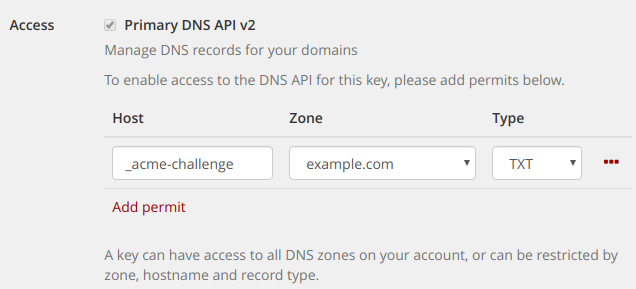
  • Configurable auth credentials – restrict access to individual records, or record types.  Ideal for Let’s Encrypt or other DNS-based challenges.
  • Choice of JSON or zone file format for input and output.
  • Atomic multi-record updates – update arbitrary sets of records in a single transaction.
  • Form parameters for record creation – record creation can be trivially scripted using curl.
  • Broad record type support – CAA, SSHFP, TLSA, SRV and many more.

For a walk through of the features of the new API, please see our DNS API tutorial , or for more details see the reference documentation.

To get started with the API, use the API keys section of the control panel to create some credentials.

Configurable API permits

Restricted API credentials for Let’s Encrypt challenges

The new API is currently in public beta, meaning that we reserve the right to make last minute breaking changes to the API, although we expect any such changes to be minor, and we would very much like to hear any feedback you may have.